Before the Old Line Goes Dark: A Second-SIM Porting Checklist for People Who Can't Miss a Call

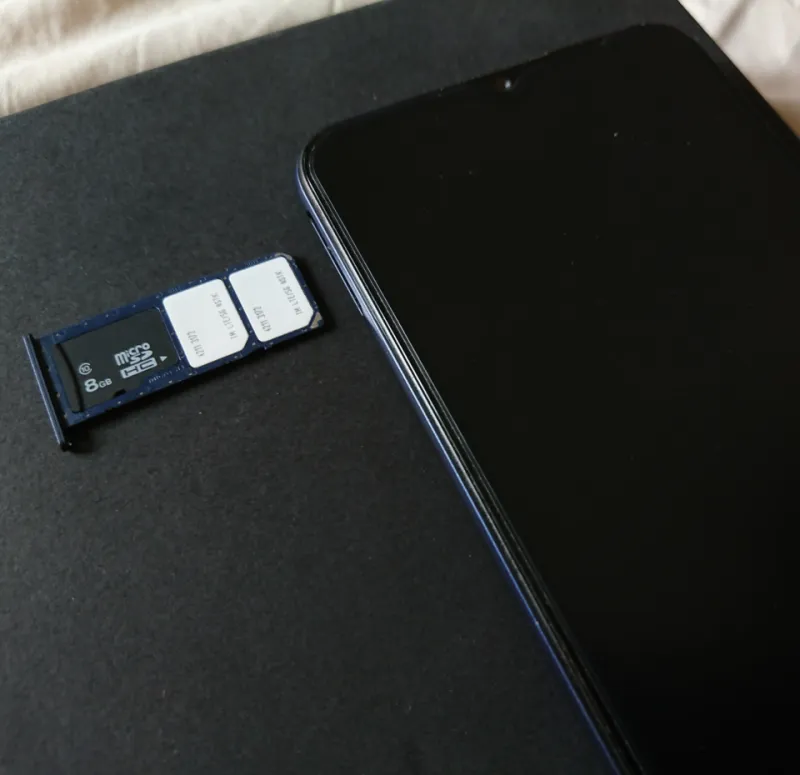
Photo: InclusiveGameLab, CC BY-SA 4.0, via Wikimedia Commons
Porting a number is one of those jobs that sounds like a five-minute admin task and then quietly eats an afternoon. That is especially true when the number in question is the one your boss rings, your bank texts and half your logins depend on. The good news is that a dual-SIM phone gives you a rare luxury: you can run the old line and the new one side by side while the port happens. The bad news is that people still cancel too early, forget which line is set to default, and then spend the evening chasing a six-digit code that has gone to the wrong slot.
This is the checklist I run before moving an existing UK number onto the spare SIM in my own handset. It is not glamorous. It is, however, much less annoying than explaining to a client why your phone has been off since lunch.
Decide which line is the grown-up before you touch anything
Before you request a PAC code, work out which SIM will be the primary line during the switch. In most cases, the old SIM should stay in slot one and remain the default for calls, texts and mobile data until the port has actually completed. The new SIM goes in the spare slot with whatever temporary number it arrives with.
Why? Because the port is a handover, not a magic trick. Until the network moves your number across, the old SIM is still the one people are dialling and the one your bank knows about. If you flip your default line to the new SIM too early, you create a small window where outgoing calls come from a number nobody recognises. That is fine for a takeaway. It is less fine for a work call.
There is an exception: if your old line is on a dying handset or a contract you are desperate to leave, you may want the new SIM to take over sooner. Even then, keep both SIMs in the phone and keep the old one active until the port is confirmed. A dual-SIM handset is basically a safety net here. Use it.
The PAC code is not a cancellation notice
In the UK, you get a PAC code by texting PAC to 65075 from the number you want to keep. It is free, and it is valid for 30 days. The important bit is that requesting a PAC does not cancel your old service. Giving the PAC to your new network starts the porting process, but the old account usually stays live until the switch is done.
Do not ring your old provider and cancel the line first. That is the classic own goal. If the number is cancelled before the port completes, you can lose it altogether, and recovering a number from the void is not a fun customer-service adventure. Keep paying the old bill until you have tested the new setup.
Also check that the number is still in your name and that you can receive texts on it. If the old SIM is already dead, the port will not happen. Boring admin, yes, but it is the foundation of the whole job.
Choose your porting window like a shift pattern
Porting dates are usually set by the new provider, and under the current UK switching rules you should not be waiting weeks. In practice, the number often moves on the next working day, but the exact time can vary. Some ports happen in the morning, some later, and your number may be briefly unavailable while the networks shuffle things around.
That makes the porting window a scheduling decision, not just a technical one. If you have a big client call at 10am, do not book the port for that morning unless you enjoy living dangerously. Pick a day when you can keep an eye on your phone and have a backup way to make calls, such as Wi-Fi calling on the other line or a desk phone.
I also avoid starting a port on a Friday. If something goes sideways, you want normal working days on your side, not a weekend of hold music.
The night-before settings audit
Once the port is booked, spend ten minutes going through the settings that decide where calls and texts actually land. On most dual-SIM phones you will find these under mobile network settings, SIM manager, or something similarly sensible.
Check the default line for calls, the default line for SMS, and the default line for mobile data. It is easy to leave one of these pointing at the wrong SIM and then wonder why your data has fallen off a cliff. I also check whether the phone has a toggle for “always ask” before sending a text, because that is genuinely useful during a port.
If you use iMessage or RCS, be aware that these services can get confused when a number changes. Do not panic if messages take a little while to settle. The plain old SMS test is the one that matters first.
Test the boring things before you trust the switch
Once the port completes, do not simply admire the signal bars and move on. Run a proper test.
Start with an incoming call from another phone. Then make an outgoing call and confirm the number displayed is the one you expect. Send a text and receive one back. Then test the thing everyone forgets: two-factor authentication. Log into your bank or another service that sends a code by SMS, and make sure the code arrives on the newly ported line.
This is where dual-SIM phones earn their keep. You can leave the old SIM in the phone and see which line catches which message. If a code lands in the wrong place, you can fix your default SMS line before it becomes a problem.
I also ring my own number from both SIMs. It sounds ridiculous, but it confirms which line is live and which one is just sitting there pretending.
Do not cancel until the dust settles
Only cancel the old service once the new line has handled calls, texts and at least one login code without drama. Keep the old SIM inserted until you are satisfied, then cancel the old account properly. If you ported the number away, the old line will stop working anyway, but you still want to close the billing side so you are not paying for a ghost.
A number port is not difficult. It is just a sequence of small steps that punish impatience. Keep the old line as the primary until the handover is done, test the unglamorous stuff, and let the dual-SIM setup do the heavy lifting. Your work calls and your bank codes will thank you.